Align English-Chinese Files with LF-aligner in Linux
An English-Chinese corpus would be nice after you scraped it from the Internet until you are stunned by the length of paragraphs though they are aligned. The worst of it is that they are not aligned because of the websites lacking clear organization.
The main objective is to split and align sentences from a pair of aligned or unaligned English and Chinese text files respectively.
There are pretty many tools which do the trick for us including ABBYY Aligner and built-in tools of OmegaT, to name a few.
It would be tedious to align a large file or a ton of files manually, however. Automating the boring tasks are more than just an attractive option. it is the most efficient method for people like me who hate repetitive tasks.
Meets LF Aligner which is actually hunalign with GUI for windows platform. So why do we have to use it instead of hunalign?
The main reason is that it is integrated with more than hunalign. It is also shipped with additional handy functions like sentence segmentation, removing duplicate sentences, or writing to TMX files for CAT like SDL Trados.
Apparently LF Aligner for Linux doesn’t keep up with that for Windows, but with version 3.11 it works like a charm for existing alignment tasks. Note that for Windows a bat file can automate a bunch of alignment tasks while for Linux a pile of ./LF_aligner_3.11.sh commands don’t work as expected as the terminal always shows the prompt instead of executing them one after another.
So where does it go wrong? The point is, the actual command is perl ./scripts/LF_aligner_3.11_with_modules.pl if you open up this bash script in your editor.
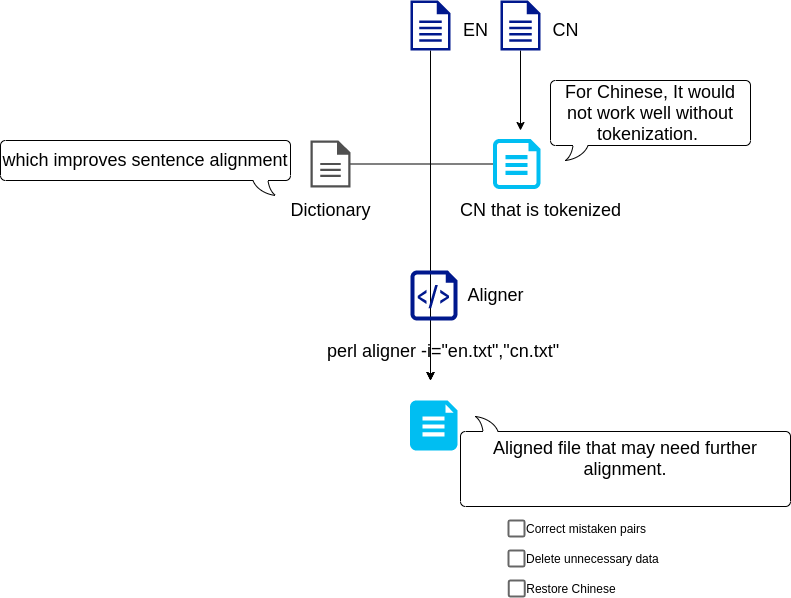
Automating multiple tasks aside, the result of only a pair of English-Chinese files alignment would be pretty messy. There are main two reasons:
- You need to provide a large dictionary file enough to fit in with the specific text content.
- It is necessary to tokenize Chinese text files.
Therefore, we can write commands based on these and we are good to go. We can use the VS Code editor or scripting languages to generate a sequence of commands for further execution. As for Chinese tokenization, I use the jieba library.
Check out a simple flow chart below: